上周瑞幸开放了一个叫 My Coffee Skill 的东西,以后我们就可以直接在 AI 聊天框里面通过这个 Skill 搜店、看菜单、下单、生成支付码了。
这篇文章做三件事:讲 Skills 是什么,讲瑞幸这个 Skill 能干什么,然后写完整代码让它真的跑起来。
Skills 是什么
先从一个问题开始:你写过 MCP Server 吗?
如果写过,大概知道那套流程:定义工具、注册服务、告诉 LLM 有哪些工具可以用。LLM 根据工具描述决定要不要调用、怎么调用。
Skills 解决的是另一个问题。
工具(Tool)回答「LLM 能做什么」,调用 API、查数据库、执行计算。Skills 回答「LLM 该怎么做」,把复杂的、有步骤的操作流程打包起来,让 LLM 按需加载。
langchain4j 从 1.12.1 版本引入这个机制。一个 Skill 就是一个目录,里面有一个 SKILL.md,内容就是给 LLM 的指令。LLM 不会在启动时把所有 Skill 都加载进来,只在需要的时候激活对应的 Skill,然后按指令行事。初始上下文保持精简,Token 消耗少。
两种工作模式
langchain4j 提供两种集成方式,差别挺大。
Tool 模式:LLM 激活 Skill 之后,通过调用你预先定义好的 Java 工具完成任务。安全、可控,生产环境该用这个。
Shell 模式是实验性功能。LLM 只有一个工具:run_shell_command。它通过执行 Shell 命令来读取 SKILL.md、运行脚本、完成任务。没有预定义工具,LLM 像在终端里工作的开发者一样一步步跑命令。
瑞幸的 My Coffee Skill 用的就是 Shell 模式。Skill 包里包含了脚本,LLM 按照 SKILL.md 的指引调用这些脚本和瑞幸的服务器通信。
Shell 模式有一条警告要认真对待:LLM 可以在你的机器上执行任意命令。只在完全信任输入、完全控制环境的情况下用。
瑞幸 My Coffee Skill 能做什么
瑞幸在 https://open.lkcoffee.com/skill 开放了这个 Skill,支持搜索附近门店、浏览菜单、预览订单、创建订单并生成支付二维码、查询订单状态、取消订单。
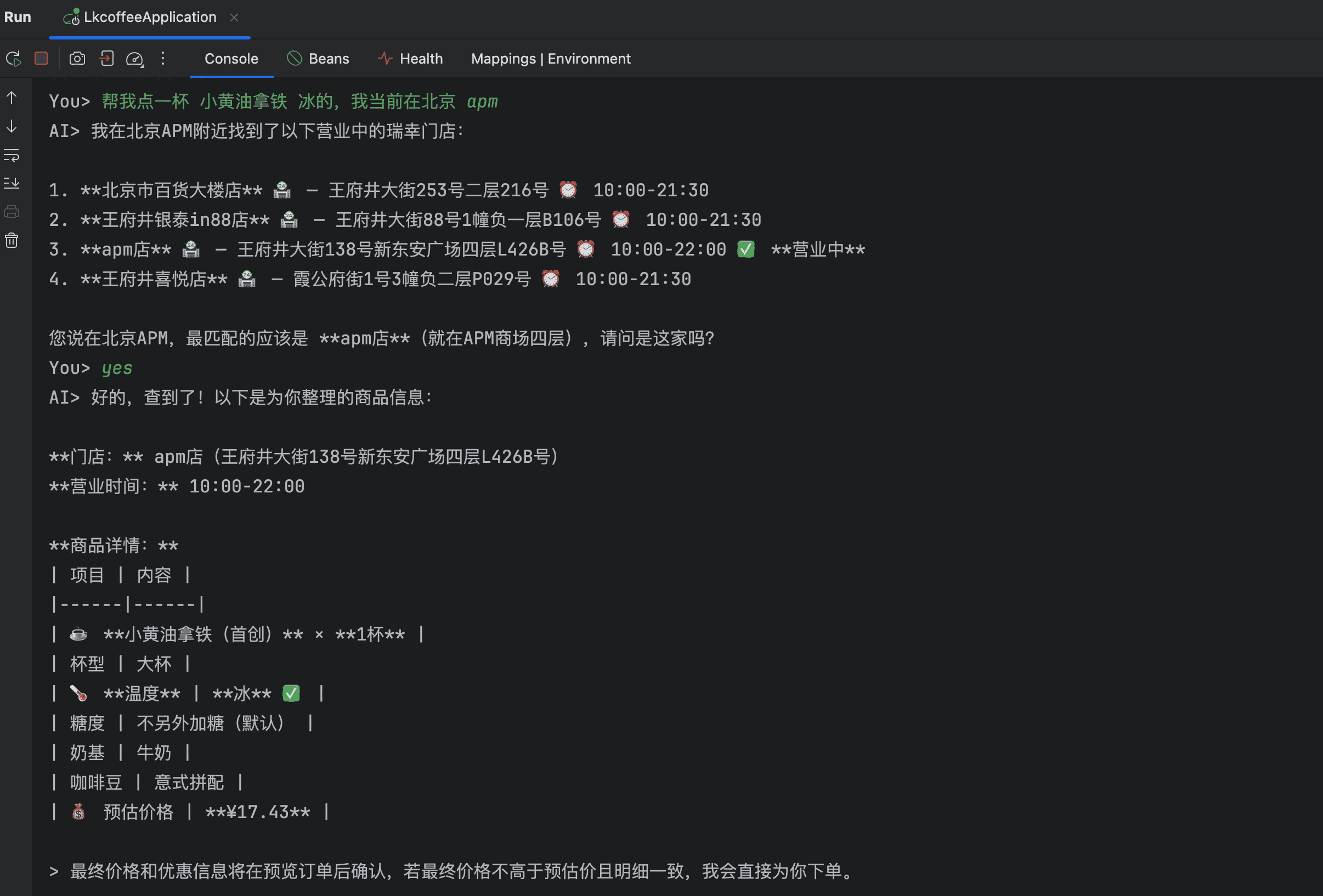
我在本地测了一下。告诉它「帮我点一杯小黄油拿铁冰的,我在北京 APM」:
- 它搜索了 APM 附近的瑞幸门店,列出了四家
- 确认要去 APM 店
- 查到商品信息,确认温度冰的,价格 17.43 元
- 创建订单,返回支付二维码
整个过程没有写一行点单逻辑,全靠 Skill 指令驱动完成。
代码实现
第一步:Maven 依赖
1
2
3
4
5
6
7
8
9
10
11
12
13
14
15
16
17
18
19
20
21
22
23
24
25
26
27
28
| <dependencies>
<dependency>
<groupId>org.springframework.boot</groupId>
<artifactId>spring-boot-starter-webmvc</artifactId>
</dependency>
<dependency>
<groupId>dev.langchain4j</groupId>
<artifactId>langchain4j</artifactId>
<version>1.16.1</version>
</dependency>
<dependency>
<groupId>dev.langchain4j</groupId>
<artifactId>langchain4j-open-ai</artifactId>
<version>1.16.1</version>
</dependency>
<dependency>
<groupId>dev.langchain4j</groupId>
<artifactId>langchain4j-skills</artifactId>
<version>1.16.1-beta26</version>
</dependency>
<dependency>
<groupId>dev.langchain4j</groupId>
<artifactId>langchain4j-experimental-skills-shell</artifactId>
<version>1.16.1-beta26</version>
</dependency>
</dependencies>
|
有两个 Skill 相关的依赖需要注意:langchain4j-skills 是核心模块,langchain4j-experimental-skills-shell 是 Shell 模式专用的。两个都要加。
第二步:下载并安装 Skill
瑞幸的 Skill 是一个 zip 包,程序启动时动态下载解压:
1
2
3
4
5
6
7
8
9
10
11
12
13
14
15
16
17
18
19
20
21
22
23
24
25
26
| private static final URI MY_COFFEE_SKILL_URI = URI.create(
"https://unpkg.luckincoffeecdn.com/@luckin/my-coffee-skill@latest/dist/my-coffee-skill.zip"
);
private static final Path SKILLS_DIR =
Path.of("target", "luckin-skills", "skills").toAbsolutePath().normalize();
private static void installMyCoffeeSkill() throws IOException, InterruptedException {
Path workDir = SKILLS_DIR.getParent();
deleteRecursively(workDir);
Files.createDirectories(SKILLS_DIR);
Path zipPath = workDir.resolve("my-coffee-skill.zip");
HttpRequest request = HttpRequest.newBuilder(MY_COFFEE_SKILL_URI)
.timeout(Duration.ofSeconds(30))
.GET()
.build();
HttpResponse<Path> response = HttpClient.newBuilder()
.connectTimeout(Duration.ofSeconds(15))
.followRedirects(HttpClient.Redirect.NORMAL)
.build()
.send(request, HttpResponse.BodyHandlers.ofFile(zipPath));
unzipSecurely(zipPath, SKILLS_DIR);
Path skillFile = SKILLS_DIR.resolve("my-coffee").resolve("SKILL.md");
}
|
第三步:创建 AI 服务
1
2
3
4
5
6
7
8
9
10
11
12
13
14
15
16
17
18
19
20
21
22
23
24
25
26
27
28
29
30
31
32
33
34
35
36
37
38
39
40
41
| private Assistant createAssistant() throws IOException, InterruptedException {
if (!skillInstalled) {
installMyCoffeeSkill();
skillInstalled = true;
}
List<FileSystemSkill> fileSystemSkills = FileSystemSkillLoader.loadSkills(SKILLS_DIR);
ShellSkills skills = ShellSkills.builder()
.skills(fileSystemSkills)
.runShellCommandToolConfig(RunShellCommandToolConfig.builder()
.workingDirectory(SKILLS_DIR)
.maxStdOutChars(60_000)
.maxStdErrChars(20_000)
.build())
.build();
ChatModel chatModel = OpenAiChatModel.builder()
.baseUrl("https://api.deepseek.com")
.apiKey("你的 DeepSeek API Key")
.modelName("deepseek-v4-flash")
.parallelToolCalls(false)
.timeout(Duration.ofMinutes(5))
.maxRetries(1)
.build();
return AiServices.builder(Assistant.class)
.chatModel(chatModel)
.chatMemory(MessageWindowChatMemory.withMaxMessages(20))
.toolProvider(skills.toolProvider())
.maxToolCallingRoundTrips(20)
.systemMessage(buildSystemMessage(skills))
.build();
}
interface Assistant {
String chat(String userMessage);
}
|
系统提示不能省,瑞幸 Skill 的特殊处理逻辑要在这里指定:
1
2
3
4
5
6
7
8
9
10
11
12
13
14
| private static String buildSystemMessage(ShellSkills skills) {
return """
你是一个瑞幸咖啡点单助手。
可用的 Skills:
%s
收到与 Skill 相关的请求时,先读取对应的 SKILL.md 再处理。
点单流程:确认门店 → 确认商品 → 预览订单 → 用户确认后再下单。
如果 previewOrder 返回非空的 couponCodeList,原样传给 createOrder。
支付时只展示二维码图片和可点击链接,不展示 payOrderUrl。
付款前不显示取餐码和取餐时间。
不暴露 API Key、环境变量、Shell 命令、原始 JSON 等内部信息。
""".formatted(skills.formatAvailableSkills());
}
|
parallelToolCalls(false) 这行要注意,Shell 模式下 LLM 需要按顺序读文件再执行命令,并行调用会让流程乱掉。
第四步:命令行交互
1
2
3
4
5
6
7
8
9
10
11
12
13
14
15
16
17
18
19
20
21
22
23
24
25
26
27
28
29
30
31
32
33
34
35
36
37
38
39
40
41
42
43
| @Component
@ConditionalOnProperty(name = "lkcoffee.cli.enabled", havingValue = "true", matchIfMissing = true)
class CoffeeCliRunner implements CommandLineRunner {
private final ConfigurableApplicationContext context;
private boolean skillInstalled;
CoffeeCliRunner(ConfigurableApplicationContext context) {
this.context = context;
}
@Override
public void run(String... args) throws Exception {
Assistant assistant = createAssistant();
System.out.println("瑞幸点单 Agent 已就绪。输入 /exit 退出,/clear 重置对话。");
try (Scanner scanner = new Scanner(System.in)) {
while (true) {
System.out.print("你> ");
if (!scanner.hasNextLine()) break;
String input = scanner.nextLine().trim();
if (input.isEmpty()) continue;
if ("/exit".equalsIgnoreCase(input)) break;
if ("/clear".equalsIgnoreCase(input)) {
assistant = createAssistant();
System.out.println("对话已重置。");
continue;
}
try {
System.out.println("AI> " + assistant.chat(
"LUCKIN_MCP_TOKEN: 你的瑞幸 MCP Token\n" + input
));
} catch (RuntimeException e) {
System.err.println("调用失败: " + e.getMessage());
}
}
} finally {
context.close();
}
}
}
|
每条消息前面要附上 LUCKIN_MCP_TOKEN,瑞幸的 Skill 靠这个 Token 调用它的服务。Token 从 https://open.lkcoffee.com/skill 获取。
跑起来之后,就可以直接告诉它你想喝什么、你在哪:
1
2
3
4
5
6
| 你> 帮我点一杯小黄油拿铁冰的,在北京国贸
AI> 我在北京国贸附近找到了以下门店:
1. 国贸一期店 — 建国门外大街1号 10:00-21:00
2. 国贸购物中心店 — 建国门外大街1号国贸商城B1层 08:00-22:00
...
请问是哪家?
|
最后说一句
Skills 这个机制不复杂,就是把「怎么做某件事」的操作流程打包成文件,让 LLM 按需读取。有意思的地方在于,任何人都可以把自己服务的流程打包成 Skill 发出去,让接入的 Agent 直接调用,不用对方写一行业务逻辑。
瑞幸先跑了这条路。能不能跑通,今天试一下就知道了。